
What Is an Authenticator App? How It Works and Why It Matters
What Is an Authenticator App? A Beginner’s Guide
Quick Summary:
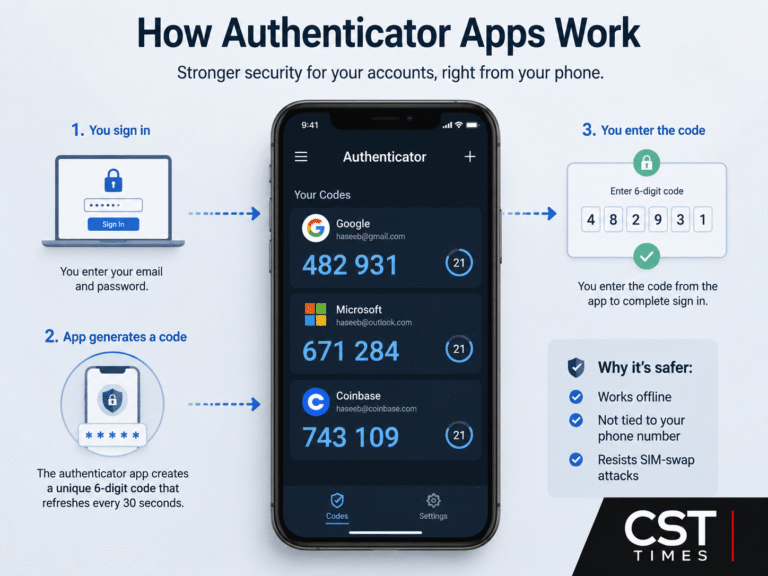
An authenticator app is a piece of software on your phone that generates a short-lived login code, usually six digits, which refreshes every 30 seconds. You enter that code along with your password when you sign in, which is why it’s called two-factor authentication (2FA).
Table of Contents
ToggleUnlike a code sent by text message, an authenticator app works entirely offline and isn’t tied to your phone number, so it can’t be hijacked through a SIM-swap attack. That’s a big part of why security agencies now rank app-based codes well above SMS for protecting email, banking, and cryptocurrency accounts.
This guide explains how these apps actually generate codes, why they’re safer than SMS, which apps are worth using in 2026, and how to set one up in a few minutes.
Key Takeaways
- An authenticator app generates a one-time code that refreshes every 30 seconds, using an open standard called TOTP (RFC 6238).
- It runs offline and isn’t linked to your phone number, so SIM-swap attacks — a real weakness of SMS codes — can’t touch it.
- CISA and the FBI have advised against relying on SMS for two-factor authentication and recommend app-based or hardware-based methods instead.
- Google Authenticator and Microsoft Authenticator are the two most widely used options in 2026, and both now offer encrypted cloud backup.
- Authy’s desktop app was discontinued in March 2024; its mobile app still works, but development has slowed, pushing many users toward alternatives.
- Authenticator apps aren’t unbeatable — a convincing phishing page can still relay your code in real time. Passkeys and hardware security keys close that gap for your most important accounts.
- Always save the backup codes a service gives you when you turn on 2FA — that’s your safety net if you lose your phone.
Table of Contents
- What Is an Authenticator App?
- How Does an Authenticator App Work?
- Why Authenticator Apps Beat SMS Codes
- The One Weakness Authenticator Apps Still Have
- Popular Authenticator Apps in 2026
- How to Set Up an Authenticator App
- Quick Checklist
- Final Thoughts
Summary Table: 2FA Methods Compared
| Method | Tied to phone number? | Works offline? | SIM-swap risk | Phishing resistance |
|---|---|---|---|---|
| SMS text code | Yes | No | High | Low |
| Authenticator app (TOTP) | No | Yes | None | Medium |
| Push notification + number matching | No | Requires data connection | None | Medium-High |
| Passkey / hardware security key | No | Yes | None | Highest |
What Is an Authenticator App?
An authenticator app is a standalone piece of software — separate from the account you’re protecting — that generates a temporary numeric code used as the second step in a two-factor login. Examples include Google Authenticator, Microsoft Authenticator, and password managers like 1Password or Bitwarden, which can also store and generate these codes.
The app doesn’t need an internet or phone signal to produce a code. Everything it needs is stored locally on your device the moment you set up 2FA for an account.
How Does an Authenticator App Work?
When you turn on app-based 2FA for an account, the service shows you a QR code (or a text string called a “setup key”). That code encodes a secret key that both the service and your app now share privately.
From that point on, your app and the service’s server each run the same math independently:
- They combine the shared secret key with the current time.
- They run that combination through a cryptographic function (HMAC-SHA1, in most implementations).
- The result is truncated into a short numeric code — typically six digits.
- Because both sides use the same secret and the same clock, they land on the same code, refreshed every 30 seconds.
This process is standardized as TOTP (Time-Based One-Time Password), defined in RFC 6238, an IETF standard that extends the older HOTP algorithm to use time instead of an event counter as the changing factor. Because the standard is open, dozens of independent apps can generate valid codes for the same account without needing to talk to each other.
Why Authenticator Apps Beat SMS Codes
SMS-based codes depend on your phone number and the mobile network carrying it — and that dependency is exactly the weak point.
- SIM-swapping: An attacker convinces (or bribes) your carrier to move your phone number to a SIM card they control. Once that happens, your texted codes go straight to them.
- SS7 network weaknesses: Text messages travel over aging telecom signaling infrastructure that wasn’t built with encryption or modern security in mind.
- Account recovery chaining: Because many services also use SMS for account recovery, a hijacked number can cascade into multiple accounts at once.
An authenticator app sidesteps all of this because it has no phone number to steal. The code comes from a secret stored on your device, not from a message sent across the mobile network. CISA, the U.S. Cybersecurity and Infrastructure Security Agency, ranks security keys as the strongest option, followed by an authenticator app with number matching, then an authenticator app with a plain one-time code — with SMS notably absent from that recommended list.
The One Weakness Authenticator Apps Still Have
Authenticator apps are a major upgrade over SMS, but they’re not immune to every attack. A well-built fake login page can ask for your password and your current 2FA code, then instantly relay both to the real site before the code expires. This is a targeted, real-time phishing attack — rarer than SIM-swapping, but it does work.
This is the gap that phishing-resistant methods close. Passkeys and hardware security keys (like a YubiKey) use cryptography that checks it’s talking to the real website before responding, so a fake page simply can’t complete the login — even if someone types in every field. For your highest-value accounts — primary email, banking, and any cryptocurrency exchange — it’s worth adding one of these on top of an authenticator app if the service supports it.
Popular Authenticator Apps in 2026
Google Authenticator
Google Authenticator is a minimalist, pure TOTP generator — it doesn’t do push approvals or passkey management. Its main historical drawback was that losing your phone meant losing every code, but Google has since added encrypted cloud backup, so accounts can be recovered on a new device without re-scanning every QR code.
Microsoft Authenticator
Microsoft Authenticator supports TOTP codes but is built around push notifications: instead of typing a number, you approve a login prompt on your phone, often confirmed with a matching-number step for extra safety. It also backs up to your Microsoft account and, inside Microsoft’s own ecosystem, supports passwordless sign-in.
What Happened to Authy
Authy was popular for years because it offered cloud sync and a desktop app — letting people view codes from a computer instead of only a phone. Twilio, Authy’s parent company, discontinued the Authy desktop apps for Windows, macOS, and Linux in March 2024, and encouraged users to switch to its mobile apps or another actively maintained authenticator instead. The mobile apps for iOS and Android still work, but Authy ties accounts to your phone number, a design choice that draws the same SIM-swap-adjacent criticism as SMS itself. If you’re still using Authy, it’s worth evaluating whether a current, actively developed app fits your needs better.
Other Options Worth Knowing
Open-source and password-manager-integrated alternatives have grown more popular alongside Authy’s decline, including standalone apps with encrypted backups and TOTP support built directly into password managers like 1Password and Bitwarden — useful if you’d rather manage passwords and 2FA codes in one place.
How to Set Up an Authenticator App
- Download a reputable app from your phone’s official app store.
- Open the security settings of the account you want to protect and choose “authenticator app” as your two-factor method.
- Scan the QR code the service shows you (or enter the setup key manually if scanning isn’t available).
- Enter the six-digit code your app just generated to confirm the pairing worked.
- Save the backup codes the service provides in a safe place — a password manager or a printed copy, not just a screenshot on the same phone.
Quick Checklist
- Use an authenticator app instead of SMS wherever a service allows it — especially for email, banking, and crypto exchange accounts.
- Store backup codes somewhere other than the phone that holds your authenticator app.
- Add a passkey or hardware key for your highest-value accounts if the service supports one.
- If you’re still on Authy desktop, migrate your codes to an actively maintained app.
- Never enter a 2FA code on a page you reached through a link in an email or text — go to the site directly instead.
Final Thoughts:
An authenticator app is one of the simplest security upgrades available: it’s free, takes a few minutes to set up, and removes the phone-number dependency that makes SMS codes vulnerable to SIM-swapping. For crypto exchange accounts specifically — a frequent target for SIM-swap attacks — moving from SMS to an app-based code is one of the highest-value changes you can make in a single sitting. For your most critical accounts, pair it with a passkey or hardware key where one is offered.
FAQs
Is an authenticator app free?
Yes. Google Authenticator, Microsoft Authenticator, and most alternatives are free to download and use.
What happens if I lose my phone?
Use the backup codes the service gave you at setup, or restore from encrypted cloud backup if your app supports it (Google Authenticator and Microsoft Authenticator both do). Without either, you’ll need to go through the account’s manual recovery process.
Can one app handle multiple accounts?
Yes. A single authenticator app can generate codes for as many accounts as you add — there’s no need for a separate app per service.
Is Authy still safe to use in 2026?
The mobile app still generates valid codes, but Twilio discontinued the desktop version in 2024 and has slowed development on the product overall. It isn’t unsafe to keep using, but it’s worth considering an actively maintained alternative.
Are authenticator apps completely phishing-proof?
No. They block SIM-swapping and basic automated attacks, but a targeted, real-time phishing page can still relay your code. Passkeys and hardware security keys offer stronger protection against that specific attack.
Do I still need SMS as a backup option? Keep it enabled only if a service requires a fallback method — but avoid relying on it as your primary second factor when an app-based or hardware option is available.
Disclaimer
This article provides general security information current as of publication. Setup steps, app features, and product availability can change — always follow the specific instructions provided by each service, and consider your organization’s IT or security policies for work accounts.
Follow us on Social media :
About The Author

Haseeb Jabbar
Haseeb Jabbar writes about crypto, finance, technology, and AI at CST Times, sharing research-based guides, timely news, and free tools and calculators to help readers make informed decisions.
