
How to Create a 100% Secure Binance Account in 2026
Quick summary
Binance is the world’s largest cryptocurrency exchange with over 185 million users across 180+ countries. Creating an Binance account takes five minutes. Creating a secure one takes thirty. Those thirty minutes are the most important you will spend in your entire crypto journey — and this guide walks you through every single step.
Table of Contents
Toggle
185M+
Registered users worldwide
350+
Cryptocurrencies listed
99.9%
180+
Countries supported
$76B+
Peak daily trading volume
#1
Exchange by global volume
What is Binance?
Binance was founded in 2017 by Changpeng Zhao — known globally as “CZ” — and rapidly became the world’s largest crypto exchange by trading volume. The platform lets you buy, sell, and trade hundreds of digital assets including Bitcoin, Ethereum, BNB, Solana, and many more.
Beyond basic trading, Binance offers staking, savings products, futures trading, an NFT marketplace, and a Web3 wallet. For beginners, the interface is clean and easy to navigate. For experienced traders, it provides professional-grade tools and deep liquidity.
GEO note: Binance operates globally but is restricted in some regions. US residents use Binance.US, a separate entity. Some services are limited in the UK and Ontario, Canada. In most of South Asia, Southeast Asia, the Middle East, and Africa, Binance operates fully. Always check local regulations before registering.
2. Before you start — what you need
| What You Need | Details | Status |
|---|---|---|
| Valid Email Address | Use a dedicated crypto-only email, not your regular inbox. | Required |
| Phone Number | For SMS verification and security alert backups. | Required |
| Government-Issued ID | Passport, national ID card, or driver’s licence for KYC. | Required |
| Front-Facing Camera | For the facial recognition selfie during identity check. | Required |
| Authenticator App | Download Google Authenticator or Authy before you start. | Recommended |
| Password Manager | Bitwarden (free) or 1Password to generate strong passwords. | Recommended |
| Pen and Paper | To write your 2FA backup key offline — this matters more than most people realise. | Recommended |
3. Create your account — step by step
Visit the official website
Type binance.com directly into your browser bar. Never click links from emails, Telegram, or social media. Phishing websites copy Binance’s design exactly using URL variations like binnance.com or binance.co. Bookmark the real URL the moment you land on it.
Fill in your registration details
1. Enter your email address
Use a dedicated email you don’t share with social media or shopping sites. If those accounts are breached, your Binance account stays completely isolated.
2. Create a strong, unique password
Minimum 8 characters — uppercase, lowercase, numbers, and at least one symbol. Use a password manager to generate it. A strong format looks like: csttimes 2026
3. Optional referral code
If you have a referral code from a trusted source, enter it here for possible fee discounts. Completely optional — skip it freely.
4. Accept terms and create account
Read the Terms of Service before ticking the box. This is a real legal agreement between you and Binance under financial regulations in your country.
CST Times tip: Never reuse a password from any other site. If that site is breached, attackers run an automated attack called credential stuffing — they try the same password on Binance, Gmail, and every major exchange within hours. A unique password stops this entirely.
4. Verify your email and phone number
Email verification
After registering, Binance sends a 6-digit code to your email. Open it, copy the code, and enter it on the verification page. Valid for 30 minutes. If you don’t see it, check spam and search “Binance” — some providers filter it automatically.
Phone verification
Enter your country code and phone number. Binance sends an SMS code to confirm. This links your mobile to the account and enables real-time security alerts and recovery options.
Delivery issue? If Binance emails keep failing, switch to ProtonMail or iCloud. Some internet providers in certain regions block Binance emails. ProtonMail consistently delivers them without filtering.
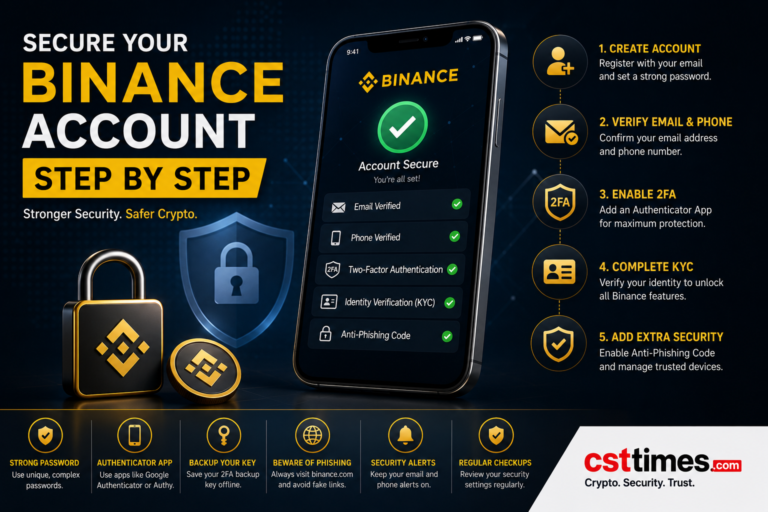
5. Enable two-factor authentication (2FA)
2FA is the single most impactful security step you will take. It adds a second layer beyond your password — even if someone steals your credentials, they cannot log in without your live 2FA code.
| 2FA Method | Security | How It Works | Best For |
|---|---|---|---|
| Google Authenticator | Very High | New 6-digit code every 30 seconds, fully offline. | Most users — best balance of security and ease. |
| Authy | Very High | Same as above with encrypted cloud backup. | Users who switch phones frequently. |
| Hardware Key (YubiKey) | Highest | Physical USB/NFC device — tap to authenticate. | Large balances and professional traders. |
| SMS Text Message | Medium | Binance texts a code to your phone. | Backup only — vulnerable to SIM swap attacks. |
| Email OTP | Low | One-time code to your registered email. | Last resort and recovery only. |
How to set up Google Authenticator on Binance
1. Download Google Authenticator
Install it from the App Store (iOS) or Google Play (Android). Free, made by Google, and works entirely offline once set up.
2. Go to security settings
In Binance: Profile icon → Security → Two-Factor Authentication → Enable Authenticator App.
3. Scan the QR code
Open Google Authenticator, tap the + icon, tap “Scan a QR code,” and point your camera at the Binance screen. Links instantly.
4. Save the 16-character backup key
Write it on paper. Store it in a physically safe location — not a screenshot, not in Google Photos, not in any cloud service. If you lose your phone, this key is your only recovery path.
5. Enter the 6-digit code to confirm
Type the live code from Google Authenticator into Binance. 2FA is now active on every login and withdrawal.
Key rule: Never screenshot your QR code or backup key. Photos sync to iCloud, Google Photos, and backups automatically. Paper is safer than any cloud service when protecting your access credentials.
6. Complete KYC verification
KYC (Know Your Customer) is an identity check required by financial regulations in most countries — not just Binance policy. Without KYC, your account is severely limited: low withdrawal caps, blocked features, and potential transaction freezes.
$0–300 per day
Up to $20,000/day
Up to $80,000/day
Up to $8,000,000/day
Go to Profile → Verification in your Binance account
Select your country of residence — this determines which documents are accepted
Choose your ID type: passport, national ID, or driver’s licence
Upload a clear, well-lit photo with all four corners of the document visible
Complete the facial recognition liveness check following the on-screen prompts
Submit and wait — approval usually takes minutes, sometimes up to 24 hours
Most common rejection reason: Blurry, cropped, or poorly lit document photos are rejected by Binance’s automated AI system. Use natural light, hold the ID flat and steady, and ensure all text is readable.
7. Advanced security settings
After 2FA and KYC, these four settings take under ten minutes and dramatically raise the barrier against attackers.
Anti-phishing code
Create a short personal code like CSTTimes25 — every real email from Binance will contain it. Any Binance-looking email without your code is a phishing attempt. Delete it without clicking anything. Set up at: Profile → Security → Anti-Phishing Code.
Withdrawal address whitelist
Pre-approve specific wallet addresses for withdrawals. Once enabled, no crypto can be sent to any unlisted address — even if an attacker logs in successfully. This can prevent total fund loss even after a full login compromise. Enable at: Wallet → Withdraw → Whitelist.
Device management review
View every device signed into your account under Security → Devices. If you see an unfamiliar entry, remove it immediately and change your password. Review this list every month.
Login and withdrawal notifications
Turn on push and email alerts for every login attempt, withdrawal, and failed password entry. Real-time alerts give you minutes to respond if anything unusual occurs. Enable at: Profile → Notifications.
| Security Feature | Location | Priority |
|---|---|---|
| Authenticator App 2FA | Profile → Security → 2FA | Do First |
| KYC Verification (Level 2) | Profile → Verification | Do First |
| Anti-Phishing Code | Profile → Security | High Priority |
| Withdrawal Whitelist | Wallet → Withdraw | High Priority |
| Device Management Audit | Profile → Security → Devices | Recommended |
| Login Notifications | Profile → Notifications | Recommended |
| Hardware Key (YubiKey) | Profile → Security → Passkeys | Optional |
8. Common mistakes to avoid
Using your main personal email — one breach exposes your crypto account
Setting a weak or reused password from another platform
Skipping 2FA because login feels slightly slower — this is how most accounts are stolen
Screenshotting the 2FA QR code or backup key — cloud-synced photos are not safe storage
Storing recovery codes in WhatsApp, Telegram, email drafts, or any cloud service
Clicking “Binance” links from Google search ads — phishing sites regularly buy these placements
Sharing your screen while logged into Binance on a video call or stream
Ignoring unfamiliar devices in your security settings
Skipping KYC and then being locked out during an urgent withdrawal
Accessing your account on public Wi-Fi without a VPN
Telling others how much crypto you hold — social engineering starts with shared information
Security is not a step. It is a standard.
At CST Times, we have tracked cryptocurrency platforms and digital finance for years. The pattern across every security incident we have covered is always the same: the exchange rarely fails — the user fails. People lose funds not because Binance was compromised, but because their own account security was weak.
Binance maintains a Secure Asset Fund for Users (SAFU) — a reserved pool to cover platform-level breaches. It has invested heavily in its own security infrastructure. But no exchange can protect you from clicking a phishing link on your phone, or from reusing a password that leaked from an old forum years ago.
What our team notices consistently is that people spend hours researching which coin to buy, and ten minutes on account security. That is the wrong ratio. A bad trade might cost 20%. A compromised account can cost everything — overnight, while you sleep.
Our advice: treat the security setup as the first and most important trade you make. Enable Google Authenticator. Set your anti-phishing code. Write your backup key on paper. Start with small deposits and test a withdrawal before moving significant funds. Verification holds are common on first transactions — far less stressful with $50 than $5,000.
Conclusion
Creating a Binance account is simple. Creating a properly secured one takes about thirty minutes — and those thirty minutes could be the difference between protecting your funds for years and losing everything to a single phishing attempt.
- Register at binance.com using a dedicated crypto-only email
- Set a strong, unique password using a password manager
- Verify your email address and phone number immediately after registration
- Enable Google Authenticator 2FA and write the backup key on paper
- Complete Level 2 KYC to unlock full trading and withdrawal access
- Set your personal anti-phishing code in Security settings
- Enable the withdrawal whitelist if you are holding significant funds
- Audit your device list and enable login and withdrawal notifications
- Test a small withdrawal before depositing large amounts
Stay informed, stay secure, and trade responsibly. The CST Times team is here to help you navigate digital finance with confidence.
Click the Links for More Updates
Follow us on Social media for daily Updates:
About The Author

Haseeb Jabbar
Haseeb Jabbar writes about crypto, finance, technology, and AI at CST Times, sharing research-based guides, timely news, and free tools and calculators to help readers make informed decisions.
